Genjutsu AI logoGenjutsu AI

Two photos. One hanging mic.

58th Floor AI Your studio duet.

Put you and a friend into the teal-studio performance. Choose a take, add one photo for each side of the mic, and make a 10-second AI video from the reference motion.Two photos. A teal studio. Your turn at the mic.

  • Two separate portraits
  • 10-second takes
  • 9:16 vertical
Reference take · The mic handoff · 10 seconds

Make your 58th Floor video

Choose a reference, then assign a portrait to each performer. Your opening-left and opening-right roles stay separate.

Make your 58th Floor video

Choose your studio take
Left at clip start
Try my photoJPG, PNG, WEBP · 10MB
Right at clip start
Try my photoJPG, PNG, WEBP · 10MB

First video $9.90 · one-time, no subscription

Choose your studio take

Personalized videos from $9.90 · One-time packs · Two photos per duet

Same studio. Pick your take.

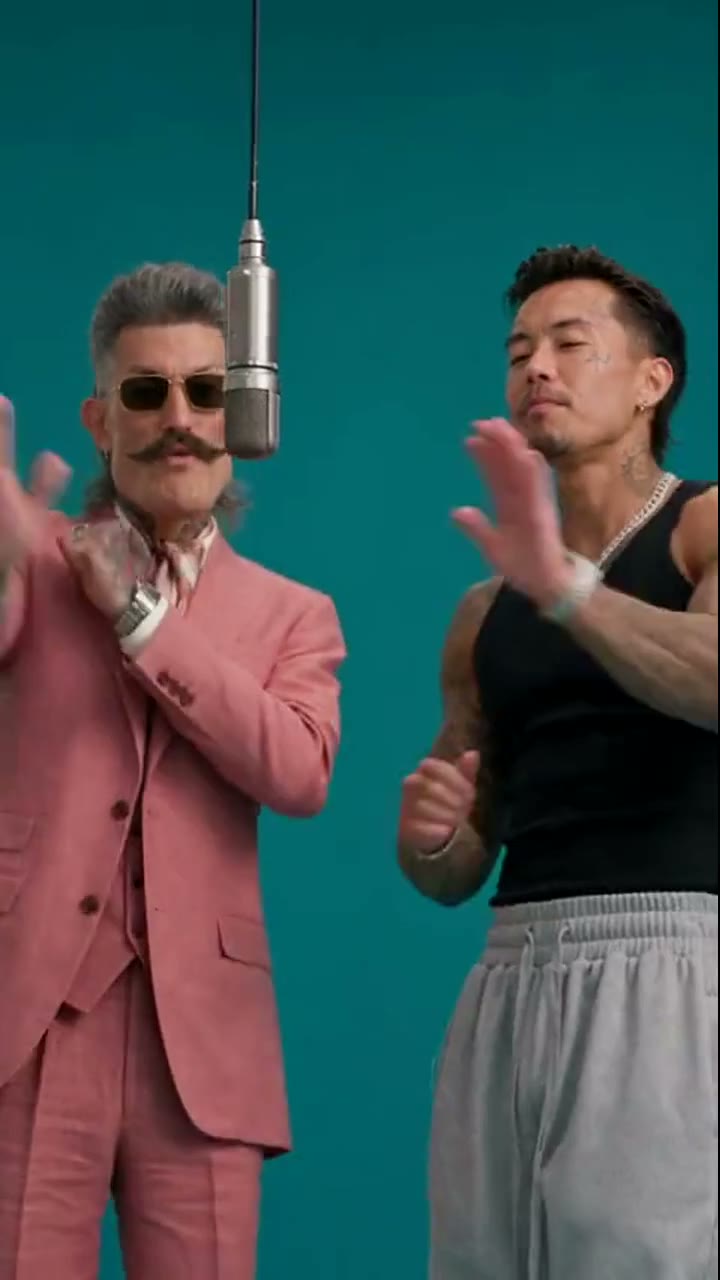
Watch the movement and check who starts on each side. Each preview is the 10-second reference used by its template.

The mic handoff

Photo 1: opening-left performer in the pink suit. Photo 2: opening-right performer in the black sleeveless top.

The wide studio duet

Photo 1: opening-left performer in the black sleeveless top. Photo 2: opening-right performer in the pink suit.

Reference examples adapted from Starrd’s 58th Floor previews. These are scene references, not results generated from your photos.

The scene behind the trend

What is 58th Floor AI?

A duet, a reaction, a turn at the microphone.

“58th Floor” is a song by Anderson .Paak and Cordae. Their COLORS performance places the pair in a teal studio, with a microphone suspended between them. The sparse setting keeps the focus on the exchange: one person performs while the other listens, reacts and takes over. It is a music-performance scene, not a high-rise apartment reveal.

The AI version recasts those two roles. Instead of filming a duet or describing choreography from scratch, you provide the portraits and choose a prepared clip. This editor uses the reference to guide the movement, gestures, framing and timing while assigning a different identity to each performer. A close-up is part of the same role, not an invitation to swap the two faces.

The two takes here use short, vertical excerpts. You can compare the opening positions before uploading and choose the performance that suits your pair. The source previews demonstrate the scene; they do not promise an identical result or perfect lip-sync for every portrait.

Read the full 58th Floor guide and watch the original performance →

From two photos to your duet

No motion prompt to write. Start with the take you want to appear in.

  1. 01

    Choose the performance

    Play both reference takes before picking one. The mic handoff moves from the opening pair into a close-up and a wider view; the wide studio duet starts with both performers in view. Both templates are 10 seconds long and prepared in 9:16. The preview is the exact motion reference for your edit.

  2. 02

    Give each role a photo

    Upload one clear portrait for the opening-left performer and another for the opening-right performer. Use a single visible face in each image, with even lighting and no hand covering it. The roles refer to the first shot of the selected take; switching templates can change which outfit is on each side. Check the preview again before generating.

  3. 03

    Generate, review and download

    Sign in and choose a credit pack if you need one, then submit your duet. The generator uses both portraits and the selected reference clip. When the video is ready, watch the full result before downloading: check both faces, the handoff, the hands and the hanging microphone, including the cuts between shots.

Get both roles right

A few checks before you generate and before you share.

Two portraits, two distinct roles

A group selfie leaves the identity assignment unclear. Use separate photos and give the clearer portrait to the performer whose close-up matters most to you. The generator follows the opening-left and opening-right roles through the clip; a later camera cut should not be interpreted as a new person.

Keep the microphone and both people

The prepared takes use a fixed 9:16 format for Shorts, Reels and TikTok. Both performers, the suspended microphone and the full-body movement are framed within the reference. Preview the whole sequence before choosing it: a close-up emphasizes one role, while the wider shot gives the interaction room to read.

Listen as well as look

Sound retention depends on the configured editing provider. The reference recording may contain explicit lyrics, and keeping its audio is not a guarantee of exact lip-sync. Listen to the downloaded file and use audio you can publish. Identify the clip as an AI remake when sharing it.

Before your first take

58th Floor AI questions

What is the 58th Floor AI trend?

It is a photo-based remake of the teal-studio performance associated with Anderson .Paak and Cordae’s “58th Floor” COLORS session. Two performers share a hanging microphone and trade the performance between them. The song title refers to the track, not a skyscraper scene. This editor is independent of COLORS and the artists.

How do I make my own 58th Floor video here?

Choose one of the two reference takes, upload a separate portrait for each performer, and generate from the studio on this page. Photo 1 goes to the opening-left performer and photo 2 to the opening-right performer. The editor submits both photos with the selected clip; you can review and download the result in the same panel.

Can I use just one photo?

These duet templates require two photo uploads so each role has an explicit identity. You can choose the same portrait for both slots if you want a double of yourself. Use photos of yourself or people who agreed to appear in the edit, and keep one visible face per upload.

How long is the video, and which format should I use?

Both prepared templates are 10-second, 9:16 reference clips at 720 × 1280. They are shortened takes, not the full 15- or 30-second examples linked from the source. The duet studio keeps the selected take’s vertical framing and duration; it does not offer a widescreen or extended version.

Is 58th Floor AI free to generate?

Watching the reference previews is free. A personalized generation uses paid credits from a one-time pack, with the price shown before payment. Uploading two portraits does not create a free personalized preview; the reference videos show the scene you will use.

Will the faces and lip movements match perfectly?

No perfect likeness or lip-sync is guaranteed. The edit is guided by both photos and the reference performance, but faces, hands and identity can change across movement or cuts. Check the complete export rather than only its first frame. Clear, unobstructed portraits make the intended identities easier to communicate.

Your friend. Your mic. Your version.

Choose a performance and bring two clear portraits. Check both roles before you start.

Make my 58th Floor video
All trending AI video memes