
Face the lens
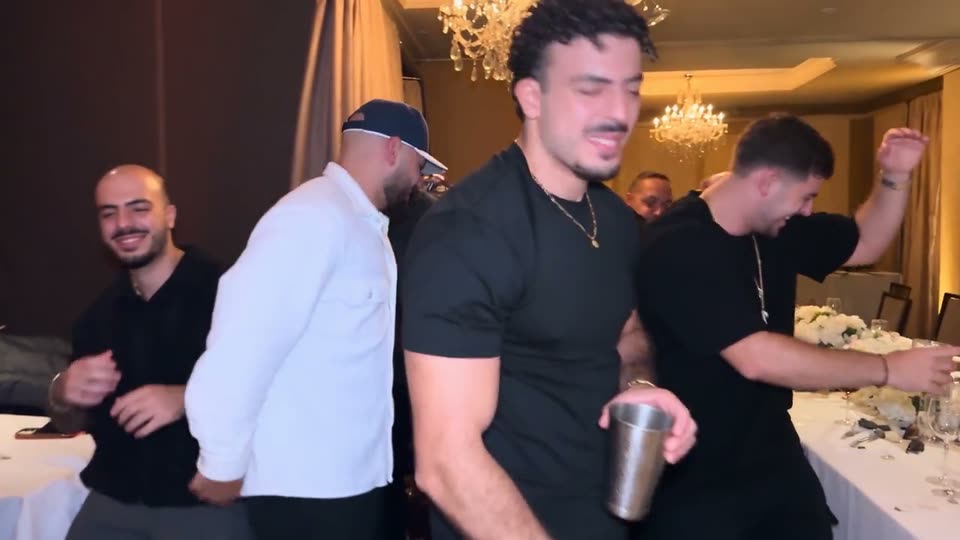
The host walks straight up to the camera and raises a hand to the lens, so the face fills the frame for a moment. A sharp, front-facing photo holds up best in that close-up.
The chandelier party trend
Add one photo and become the host of the chandelier party everyone is recreating: the walk-up to the camera, the silver cup held to the lens, the pointing, and the friends dancing behind you in a private dining room.One photo, and you host the chandelier party with the silver cup.
Pick one of the four party takes, add a clear photo and click Generate. You can also upload your own party clip of three to ten seconds.
First video $9.90 · one-time, no subscription
Starter pack: $9.90. Check the editor for your balance and generation cost.
Same chandeliers, same silver cup, same moves — a different host in each. Pick the take whose host is closest to your photo.
These previews are the reference takes the editor starts from, not personalized results.
The scene behind the trend
Crystal chandeliers. A silver cup. A host working the room.
“Burning Bridges” is a Drake song whose music video came out in May 2026. Partway through, it cuts to a party in a private dining room under crystal chandeliers, where the host moves through his friends with a silver cup, shades his eyes with a flat hand and points at the camera in one handheld shot.
In October 2026 groups of friends started re-filming that party with one of them as the host, and soon people used AI to put themselves, friends and even pets in the middle. “Burning Bridges AI” is what people search to make their own version. This page starts from re-filmed party takes and swaps in the person from your photo; the artist, his face and his song are not in it.
Your photo decides who is hosting. The take supplies the room, the friends, the cup and the moves.
Pick the black tee, the track jacket, the white polo or the teal blazer. All four follow the same routine; a host whose build and hair are close to your photo usually needs less change.
Use one face looking at the camera in good light. A confident grin suits the walk-up better than a neutral passport-style shot.
Check the displayed cost, sign in and click Generate. You get a silent widescreen MP4 in a few minutes; add the trend sound in TikTok or Instagram when you post.
Three details decide whether the clip reads as you or as a stranger with a cup.
The host walks straight up to the camera and raises a hand to the lens, so the face fills the frame for a moment. A sharp, front-facing photo holds up best in that close-up.
Only the host changes. The friends dancing around them, the tables and the chandeliers stay as they are — the room is what makes it the Burning Bridges party.
The host keeps the outfit from the take. Choose the black tee, track jacket, polo or blazer that looks most like you so the clip feels like your night out.
It recreates the party scene from Drake’s “Burning Bridges” music video: a host in a chandelier-lit dining room walks up to the camera with a silver cup while friends dance around. People recast the host with themselves, friends or pets.
No. One photo is enough — the take already has the room, the friends and the moves. You can upload your own party clip instead if you want a different room.
Each take is 10 seconds in widescreen 16:9: the walk-up, the cup to the lens and the pointing routine.
Pet hosts are part of the trend. Your photo still replaces the host in the take, so a clear pet photo can work, but the result is less predictable than with a person facing the camera.
No. The takes are silent and do not use the original recording. Add the trend sound from the TikTok or Instagram sound library when you post.
No. Genjutsu AI is an independent editing tool and is not affiliated with or endorsed by Drake, his label or his team. “Burning Bridges AI” is simply the name of the trend.
Pick a take, add your photo and walk into the party everyone is copying.
Host my party