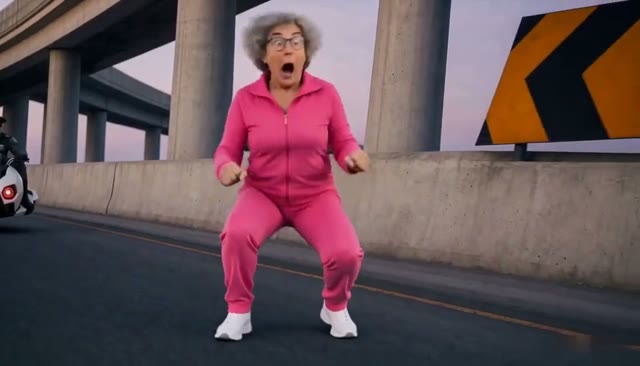
Upload your photo, choose a chase theme and become the rider on an invisible motorcycle. The selected scene supplies the action, camera movement and pursuer.
Upload videoClick to upload your video, or select an effect
One person, face clearly visible
Upload photoJPG, PNG, WEBP · 10MB
First video $9.90 · one-time, no subscription
Choose a theme
Starter pack: $9.90. Check the editor for your balance and generation cost.
See the Crazy Frog AI chase.
Explore six chase scenes. Choose a theme in the editor to create a video with your own photo.
01
The overpass chase
02
Neon city getaway
03
Chocolate factory escape
04
Pixel world pursuit
05
Inside a circuit board
06
Halloween chase
These previews show the reference scenes used by the built-in themes, not personalized results.
The idea behind the ride
What is Crazy Frog AI?
Zero wheels. All chase.
Crazy Frog AI is a short-video format inspired by the imaginary motorcycle pose associated with Crazy Frog. A person crouches low, reaches forward as though holding handlebars and races along a road with nothing underneath them. A pursuer follows, turning an impossible ride into a playful chase. The contrast between a recognizable person and the invisible vehicle is the joke.
Your photo defines the rider’s appearance, while the selected built-in theme supplies the action. This editor replaces the main rider while preserving the scene, camera movement and pursuer.
Your photo. Your turn to escape.
Your photo defines the rider. Choose the world you want to escape through and let the built-in scene supply the action.
01
Choose your chase theme
Choose from the overpass, neon city, chocolate factory, pixel world, circuit board or Halloween chase, and preview the prepared 10-second scene before generating. Prefer your own footage? Upload a clip of a crouching rider instead.
02
Add your rider photo
Choose one person with a sharp, visible face and even lighting. Include shoulders and some of the outfit rather than using a very tight face crop. Avoid group photos, sunglasses and heavy beauty filters. Use your own photo or a person who has agreed to this edit.
03
Generate and review
Check the reference framing and displayed cost before starting. Sign in and use your existing balance, or choose a credit pack when prompted. When the video finishes, inspect the face, hands and chase sequence, then download it. Your account’s video history provides another place to find the result.
Keep the chase recognizable.
A good Crazy Frog AI video depends on the source action as much as the photo. Check these details before spending a generation.
An invisible ride
The source should clearly show the low riding pose without a motorcycle under the main character. The editing direction asks the model to preserve that illusion. AI can still invent a wheel, seat or handlebar, so inspect the result instead of assuming every frame will be exact.
Room for the pursuer
Match the reference’s framing. A horizontal chase may need its full width to show both people, and cropping it vertically can remove the pursuer. Choose a source composed for your intended format. A vertical export and a native vertical scene are different things.
Sound you expect
Audio depends on the source clip and configured generation provider. This page does not supply a licensed Axel F recording. Check what your export contains and add suitable music in your publishing app when you have permission to use it. The sample player’s mute switch controls playback only.
Before you hit the road.
Is Crazy Frog AI free?+
Reading this page and viewing the illustration are free. Making a personalized video uses paid generation credits. The editor shows pricing information before you start. There is no free personalized video preview on this page, and uploading a photo alone does not create a finished chase.
Do I need to upload a reference video?+
No, it is optional. Choose one of the six built-in themes and the editor prepares the reference video automatically. If you have your own chase clip, upload it with the Upload video card instead. Either way, one clear photo replaces the main rider.
Can I replace the person chasing me too?+
This version replaces the main rider only; the pursuer stays as filmed. Separate casting needs more identity testing, especially during close-ups. A second face will not automatically replace the pursuer.
Will the result match every frame?+
The workflow aims to preserve the source action while replacing the rider, but AI edits can change faces, clothing, hands and small objects between frames. Fast flips and occlusion are especially demanding. Use the result viewer to check the entire clip before sharing it.
What if the generation fails?+
Follow the task status and error message in the editor. A technical failure and a completed video with an unwanted visual detail are different outcomes. Existing account and credit rules apply; this page does not promise a free retry for every aesthetic issue. Keep the task in your history if you need support.
Is this an official Crazy Frog product?+
No. This independent editing page is not affiliated with or endorsed by Crazy Frog or its rights holders. Use media you have permission to edit. Footage, music and photos have permissions separate from this tool.
Bring the face. Keep the chase.
Choose your theme and add your photo. Your chase starts in the editor.